Presets
An interaction bundle (Cycles, Groups, States, component Tags, and Proximity settings) serializes to a single JSON preset. Presets are how you build once and reuse everywhere: set up a working door on one actor, then apply the same bundle to twenty more with one click.
Listing and applying presets
MovaIx::Presets::ListPresets()enumerates every built-in preset (shipped with the plugin) and every user preset (<Project>/_Ix/Presets/). A user preset overrides a built-in of the same name, so you can customize a shipped template without losing it on an update.ApplyPresetToComponent(File, IC)replaces an IC's interaction data entirely with a preset's. This is the function behind the panel's template cards (The IC Control Panel's empty-state), and it's exposed to Blueprint for runtime or tool-time use of your own.
Save the real screenshot as: shot-control-panel-manage-presets.png
Saving and managing user presets
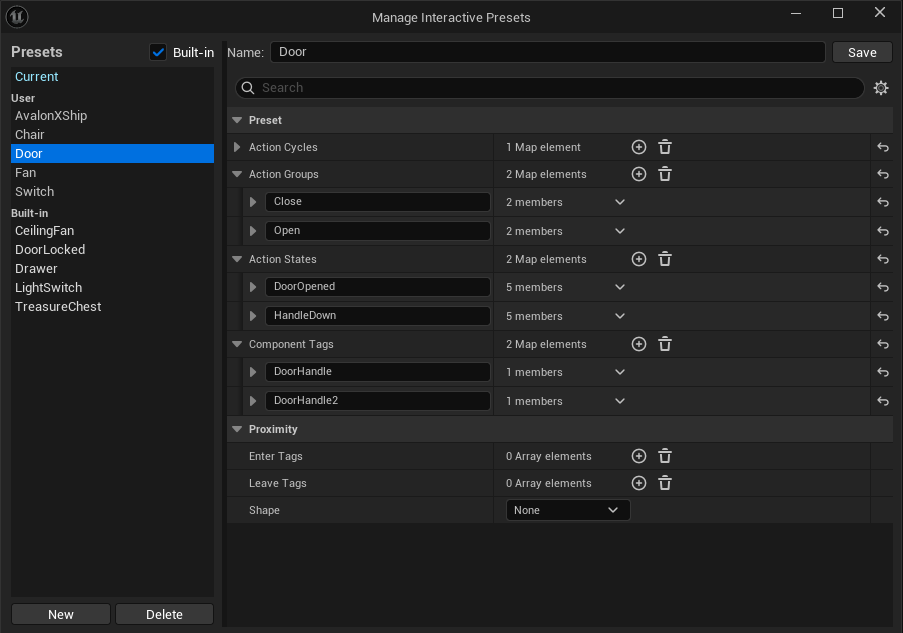
Three functions manage the user preset library, all reachable from the Manage Presets window:
Function |
Does |
|---|---|
|
Write the current IC's bundle out as a new user preset. |
|
Copy an existing preset (built-in or user) into the user library under a new name, as a starting point for a variant. |
|
Remove a user preset. Built-in presets can't be deleted, only overridden. |
The Manage Presets window edits a preset's bundle with the same property editors the IC panel uses: the interaction tree, field pickers and validation chips all work identically here, so you're never editing raw JSON by hand unless you want to.
Checking what a preset needs
Presets are built against one actor's component names, so applying a "Door"
preset built around a component called Panel to an actor whose door mesh is
named Mesh will reference something that doesn't exist.
GatherUnresolvedPresetNames runs before you commit an apply: it lists every
component or target the preset references that the destination actor lacks, so a
preset transplant tells you up front what needs wiring (rename the component to
match, or add one) instead of producing amber "unresolved" chips with no warning after
the fact.
Why plain JSON
Presets are plain JSON files under <Project>/_Ix/Presets/, no binary asset, no
engine-specific serialization quirk to work around. That makes them:
Shareable: drop a
.jsonfile to a teammate, or into a project template, andListPresets()picks it up on the next editor restart.Diffable: a preset change shows up as a readable diff in version control, the same way any other text asset does.
Portable: a preset built in one project applies cleanly in another as long as the referenced component names line up (or you fix them up first, using
GatherUnresolvedPresetNames).
Typical workflow
Set up one object's full interaction by hand (or with the recorder: see The IC Control Panel).
Open Manage Presets → Save as user preset → name it (
Door_Swing,Lamp_Proximity, ...).Select the next actor that needs the same behavior → its empty IC shows the new preset as a template card, or apply it manually via
ApplyPresetToComponent.If any targets come back unresolved, rename the destination's components to match, or duplicate the preset and adjust its targets for that shape.
See also
The IC Control Panel: the empty-state template cards, the panel's shared property editors.
Level-wide export / import: the level-wide equivalent for every placed actor at once, instead of one preset at a time.