The player Interactor: setup and use
UMovaIxInteractorComponent is the pawn-side half of the plugin. It does two
things and only those two: detection (find the best nearby interactable in
view) and interaction (trigger it, and drive the HUD prompt). Everything
else (camera focus, possession, sprint) lives in separate, optional
components on the same pawn.
Save the real screenshot as: shot-interactor-prompt-hud.png
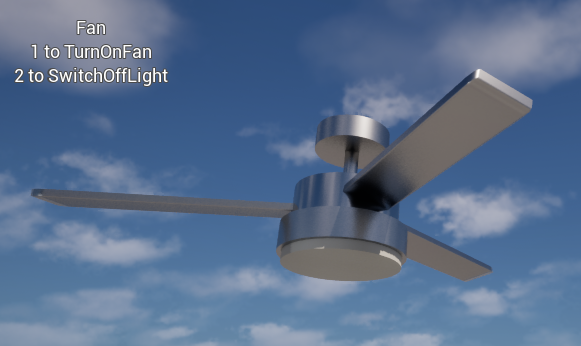
Add it to a pawn
Select your pawn (or Character) Blueprint → Add Component → Mova Interact Interactor.
Leave
bEnableTargetingon. SetDetectionRadiusandViewAngleto taste: widen the angle for a third-person game where the camera doesn't track the aim as tightly as first-person.Bind an input action to
TargetInteraction()(no argument = choice 0, the primary interaction). That's the minimum setup, no proximity volume or prompt widget required to get a door opening.Wire a prompt: bind
OnInteractEnter/OnInteractLeaveon your HUD widget to show/hide "Press F to open", readingGetCurrentActor()/GetCurrentIC()for what to display.
Tip
If your Character's capsule blocks the Visibility trace channel, detection
traces hit your own capsule first. BeginPlay auto-adjusts this. Disable it
with SetAdjustOwnerCapsuleCollision(false) if your project manages capsule
collision itself.
How it finds the closest interactable
Every tick, GetPlayerTransform() refreshes the trace origin: the eye,
not the actor origin (on a Character, the capsule center plus
EyeHeightFactor * CapsuleHalfHeight). FindClosestInteractable() then
gathers every UMovaIxComponent within DetectionRadius, drops points
outside ViewAngle degrees of the owner's forward (the view-angle cone,
drawn live by the debug overlay) line-traces for obstruction (a ~
component tag can make a blocker pass-through, see
Tag Grammar Reference), and scores survivors with
ScoreInteractable(Distance, AngleDeg, IC, Point), where lowest wins.
The default is Distance + AngleDeg * AnglePenaltyPerDegree; override the
BlueprintNativeEvent to weight type or recency differently. Gate
eligibility per-candidate with CanTargetInteractable(IC, Point): exclude
by faction, lock state, or quest flag before scoring even runs.
IsThirdPerson() auto-detects a spring arm or a distant camera, so the same
component works unmodified in first- or third-person.
Firing an interaction
Three entry points, coarsest to finest:
Call |
Fires |
|---|---|
|
The focused interaction's Nth |
|
A raw action group directly, bypassing the choice prompt: used by the per-key typing path. |
|
A list of tag expressions passed straight to |
TargetStop() cancels whatever the current target is doing.
Events for your HUD
Event |
Fires when |
|---|---|
|
An actor becomes / stops being the best target: show / hide the prompt. |
|
A choice interaction runs. MovaInteract doesn't interpret |
|
An actor enters/leaves |
|
The radial wheel's highlighted choice changes. |
FormatPromptText(Actor, Point) is a BlueprintNativeEvent: override it to
localize the prompt or swap in "Locked" instead of the verb list.
GetBestPromptWorldLocation / UpdatePromptPosition handle screen
projection for a moving target.
Choice input modes
When a point offers 2+ > choices, UMovaIxSettings::ChoiceInput (Project
Settings → Plugins → Mova Interact) picks how the player selects among them:
see Tag Grammar Reference for how a > choice is written:
Mode |
Behavior |
|---|---|
|
Digits |
|
Primary / Secondary / Ternary bound keys pick choices 0/1/2, capped at 3. |
|
A 2D direction highlights a wedge. The interact button confirms it. Gamepad-first, scales past 3 like |
Radial menu API
Save the real screenshot as: shot-interactor-radial-menu.png
// Every frame or on a stick-axis callback:
Interactor->SetRadialSelectDirection(RightStickVector);

// On the interact button:
const int32 Index = Interactor->GetRadialSelectedIndex();
if (Index != INDEX_NONE) { Interactor->TargetInteraction(Index); }
SetRadialSelectDirection(Direction)recomputes the highlight and firesOnRadialSelectionChangedon change.GetRadialSelectedIndex()returns the highlighted choice, orINDEX_NONEinside the dead zone.RadialIndexFromDirection(NumChoices, Direction, DeadZone, StartAngleDeg)is the pure static hit-test underneath both: expose it to your prompt WBP so the drawn wheel lights the exact wedge that will confirm. Wedges lay out clockwise fromStartAngleDeg(0 = straight up).
Physics impact hook
TargetImpact(ImpactStrength = 1000.0f) applies a physical hit to the
current target: wire it to a melee swing or a thrown object for
physics-based reactions or destructibles. Over the network the strength
travels via Server_TargetImpact, and the server clamps it to
MaxImpactStrength instead of trusting the client's number.
Typing / interaction mode for NPCs
For a typeable object (IC->bTypeable: a terminal, a laptop, an NPC that
takes typed commands), EnterInteractionMode(IC = nullptr) captures the
full keyboard, forwarding each key to a per-key component (key A runs
Key_A) and swallowing gameplay input while active: auto-invoked on
pressing interact against a focused typeable target. ExitInteractionMode()
restores normal input (auto-called on Esc, re-pressing interact, or losing
the target). IsInInteractionMode() and OnInteractionModeChanged(Actor)
let your UI show a "Start typing..." / "Stop typing" prompt. Typed keys route
via Server_TargetAction, the same player-owned path every networked
request uses: see Multiplayer for why that routing matters.
See also
Proximity: reacting without a prompt: the passive counterpart: no aiming, no prompt, only presence.
Tag Grammar Reference: the addressing syntax a Group/Cycle name and its targets use.
Multiplayer: how
TargetInteractionreaches the server safely.Debug overlay & troubleshooting:
mova.ix.Debugdraws the detection cone, LOS rays, and resolved tags live.