Level-wide export / import
Presets (Presets) move one actor's interaction bundle at a time. Export / Import Actions does the same job for an entire level in one pass: every interactive actor, saved to and loaded from a single JSON file.
Where it lives
Tools → Mova Interact → Export / Import Actions
Export walks every interactive actor currently in the level (Blueprint instances and placed actors alike) and writes their full interaction bundles: Cycles, Groups, States, Tags, Proximity: into one JSON file.
Import reads that file back and reconciles it against the level's current state.
The diff viewer
Import doesn't apply blindly. It opens a diff viewer (a list pane and a diff pane, multi-select) that shows what the import changes before anything is written:
Save the real screenshot as: shot-export-import-diff.png
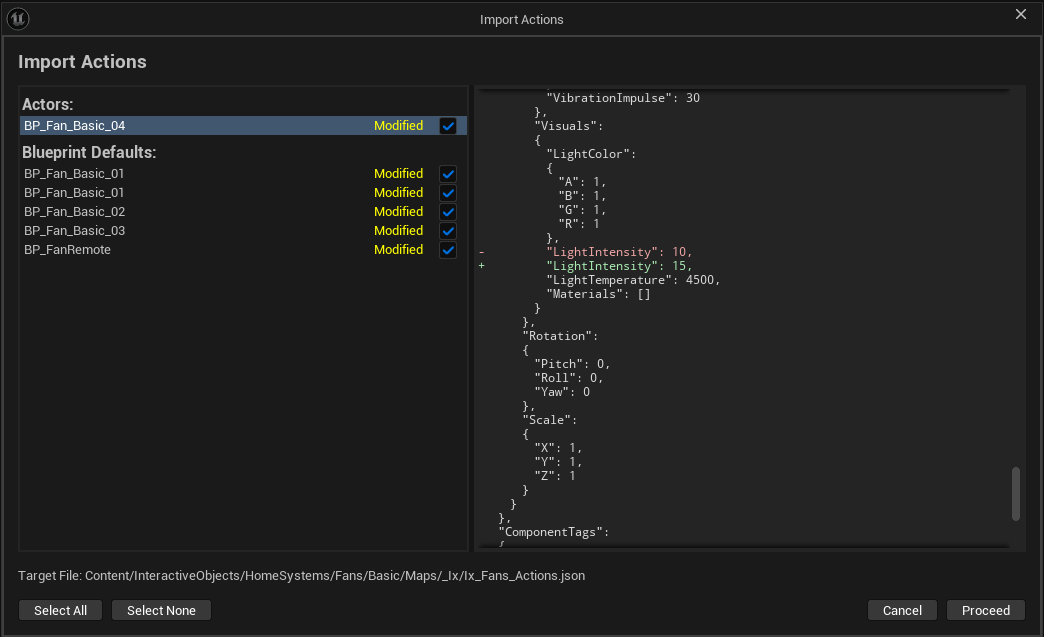
Every actor in the file is classified:
Classification |
Meaning |
|---|---|
|
The live actor already matches the file's entry, nothing to do if applied. |
|
The file differs from the live actor. The diff pane shows which fields changed. |
|
The file's entry and the live actor produce byte-identical data on comparison: the strict case of "in sync," called out separately so an exact re-export is visibly distinguishable from a merely equivalent one. |
Select one or many entries and apply only those: you are never forced to import the whole file, or to import nothing.
Blueprint defaults and placed instances, both
Export/Import applies to Blueprint class defaults as well as placed level instances, for two different workflows:
Fix the default interaction on a Blueprint (say, every
BP_Doorin the project) once, export, and re-import into another project's copy of the same Blueprint.Fix a per-instance override on one specific placed door without touching the Blueprint default at all.
The diff pane tells you which kind of entry you're looking at, so you don't accidentally overwrite an instance override with a class default or vice versa.
Why plain JSON matters
Interaction data is plain JSON, not a binary level asset:
Reviewable in version control: a level's interaction data shows up as a readable diff in a code review, the same as any other text file. A reviewer can see "the Open group's easing changed" without opening the editor.
Portable between projects: copy the exported file into another project and import it. The interaction data travels independently of the level asset itself.
Recoverable after a crash or a bad merge: the answer to "we spent a week setting up interactions and one bad merge lost them." Export regularly (or keep the exported JSON under version control alongside the level) and a bad merge, a corrupted
.uasset, or an accidental revert becomes a re-import, not starting over.
Typical workflow
Before a risky merge or a big setup pass, Export the level to a JSON file and check it into version control alongside the map.
After the merge (or after
git checkoutrecovers an old level asset), open Import, point it at the last-known-good export.Review the diff: confirm the
Modifiedentries are the ones you expect to restore, and that nothing you want to keep is about to be overwritten.Apply the selection.